Novedades

Novedades de Vrodex

Nuevas funciones, mejoras y correcciones, de las más recientes a las más antiguas. Cada actualización está disponible para todos los clientes en cuanto aparece aquí.

  1. Nuevo

    New: your own QR codes

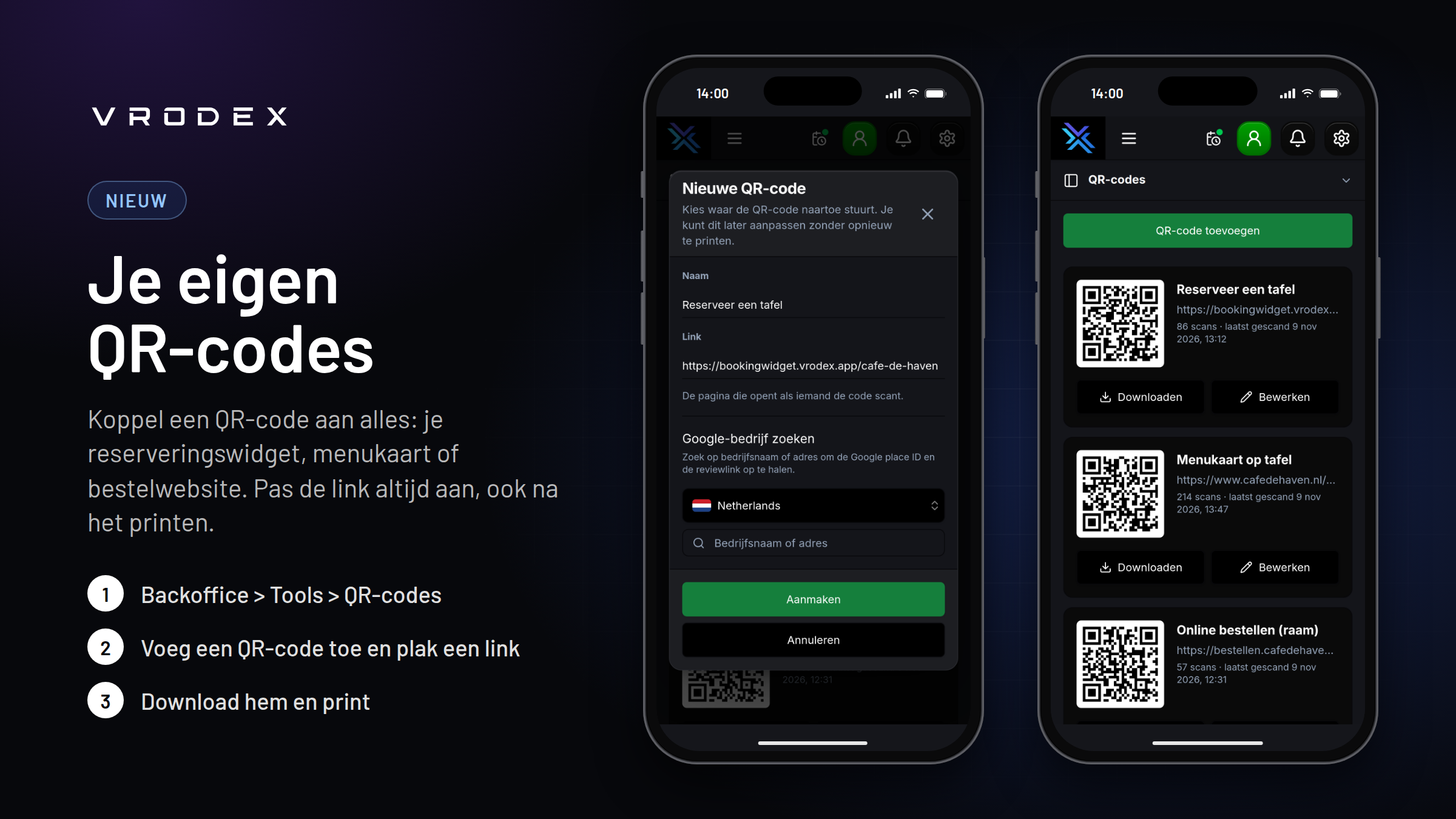
    You can now create QR codes yourself and link them to any URL: your booking widget, your menu, your ordering website, your Google reviews, or your Instagram.

    The QR codes are dynamic. You can always change the link, even after the code has been printed. Printed codes will immediately send guests to the new link.

    • Create as many QR codes as you need and give each one a name
    • See how often each code has been scanned and when it was last scanned
    • Download as PNG (up to 512×512) or as SVG for sharp print results
    • Search for your business on Google to fill in your review link

    Go to Backoffice > Tools > QR codes to get started.
  2. Mejorado

    Revenue reports now follow your business day

    Your revenue reports no longer cut the day off at midnight. Sales you close after 00:00 now count towards the business day they belong to, so a late Friday night stays on Friday's revenue, the same day as its closing report.

    By default your business day ends at 04:00. A receipt at 01:30 counts towards the previous day, and from 04:00 a new day starts. You can choose any time from 00:00 to 08:00 under Back office > Settings > Report settings. Pick a time after your latest closing. Choose 00:00 to keep counting by calendar day.

    The business day is used in:

    • The revenue report and the day, week and month reports
    • The payments, receipts, employee, category, product and discount reports
    • The dashboard revenue figures
    • Printed, downloaded and emailed reports
    • Daily report emails, which are now sent when your business day ends
    • Revenue sent to external connections
  3. Nuevo

    New: Vrodex Inbox - reply to your guests without leaving Vrodex

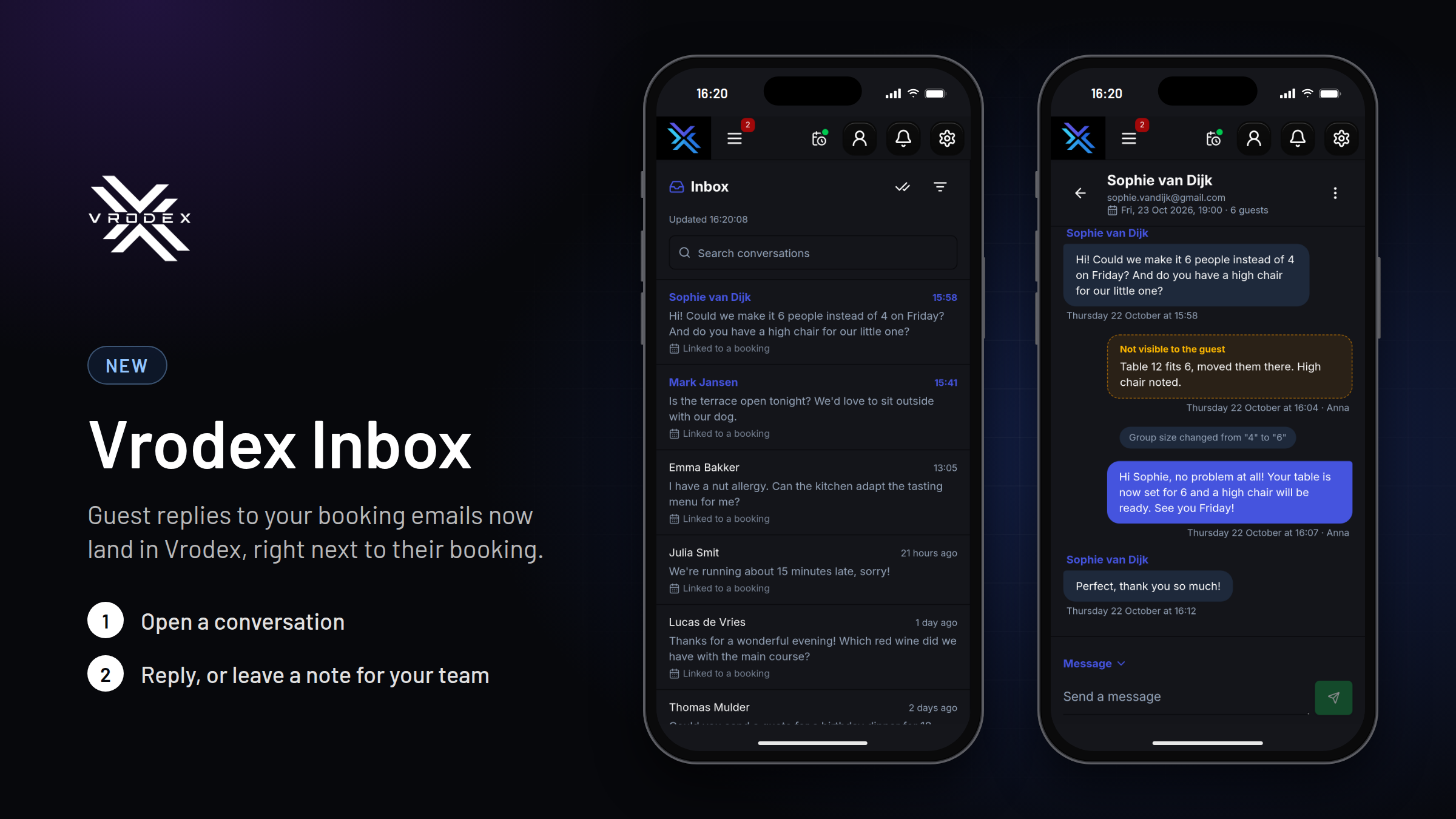
    When a guest replies to a booking confirmation or any other email from you, the response no longer disappears into your own mailbox. It lands in the new Inbox in Vrodex, linked to their booking, so your whole team can see and reply to it.

    • One conversation per guest, with the latest message at the top. Unread conversations stand out, and you can search by name, email address or message.
    • The guest's booking details are shown right there: date, time and party size at the top, and changes such as "Party size changed from 4 to 6" appear in the conversation as they happen.
    • The comment the guest left when booking is the first message, so you have the full story.
    • Reply directly from the till, your phone or your laptop. The guest receives your reply as a normal email.
    • Leave an internal note for your team. Notes are clearly marked and the guest never sees them.
    • Mark a conversation as completed or move it to spam to keep your Inbox tidy.
    • Receive a push notification when a guest replies, and tap it to go straight to the conversation.
  4. Nuevo

    New: Sales grid on handhelds

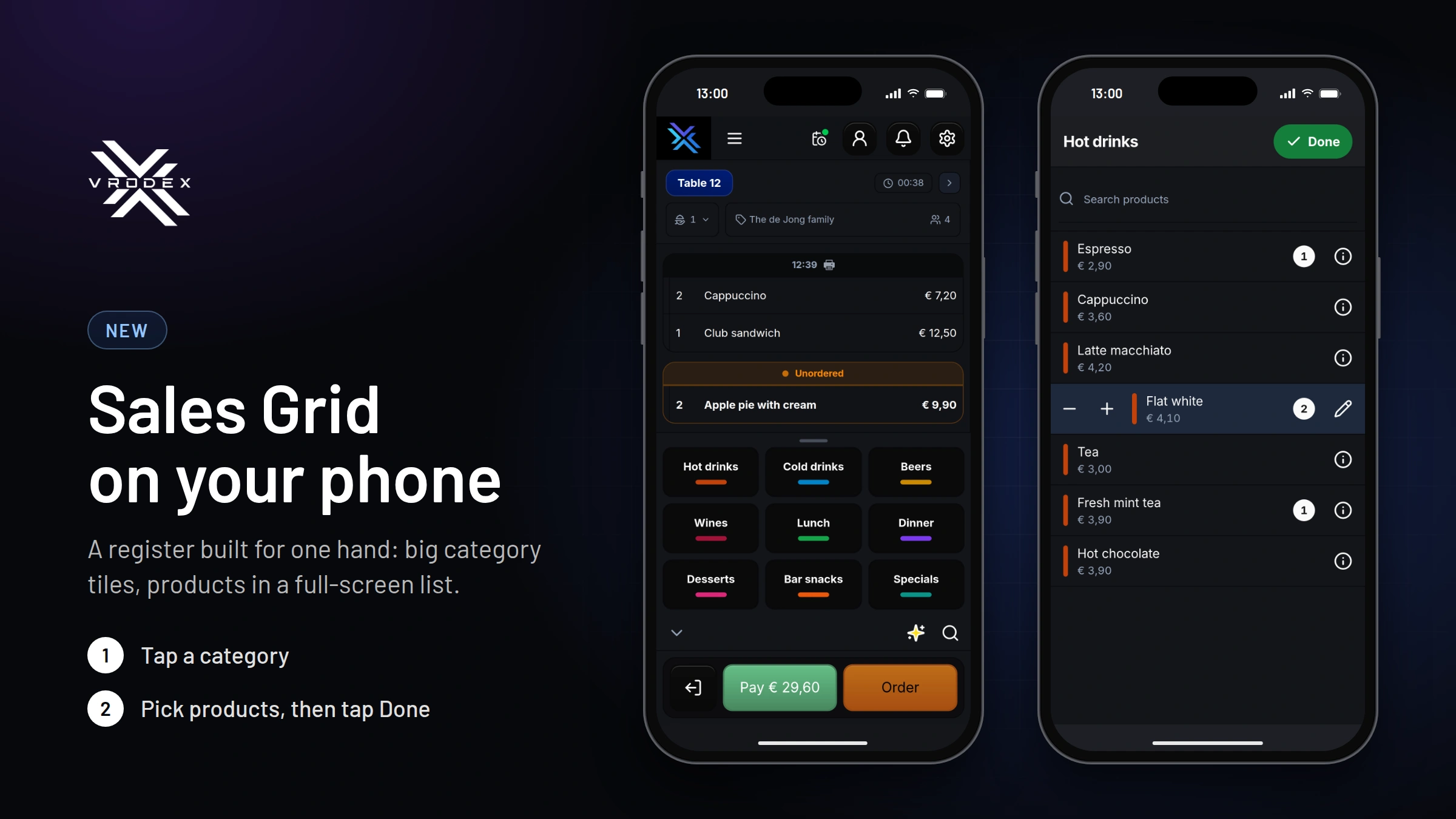
    Taking orders on your phone is now faster. With the new sales grid, the order is at the top of the screen and your categories are below as large tiles. Tap a category to open the products in a full-screen list, tap what you need and press Done. Everything is added to the order at once.

    • Large tiles that are easy to tap, even with one hand
    • Adjust the quantity with + and − before adding it
    • Search all your products with the magnifying glass
    • Swipe the grid down to give the order more space

    How to enable it: go to Backoffice → Settings → Device configurations, open the configuration your phones use and set "Cash register view on phone" to "Sales grid". New configurations use the sales grid by default. It only appears on phones; tablets and cash register terminals keep the regular cash register.

Empieza ya

Prueba Vrodex gratis. Empieza hoy.

Personas reales que cogen el teléfono. No un número en una cola. Eso es lo que defendemos.

30 días gratis Sin compromiso Cancelas cuando quieras*

Todos los precios indicados no incluyen el 21% de IVA.

*No aplicable con un contrato plurianual.